

How to Sell More: No-Code AI Workflows
Many of us feel stuck in a productivity trap. We spend entirely too much time on tasks that do not contribute to growth or the bottom line.
Endless data entry. Double entry. Constant context switching.
These hidden drains on your day demoralize your team and ruin productivity. Manual processes create bottlenecks that keep you from growing. But there is a way to break free. You can improve your deal velocity, improve your bottom line, and improve communication throughout your entire organization.
And you do not need a computer science degree to do it.
In a recent Sell More Academy masterclass, we explored how to automate your business using a natural language approach. We broke down the fear of complication and showed exactly how to build smarter workflows that actually work for you.
Here are the core concepts you need to understand to become an automation architect.
The Core Anatomy of Every Workflow
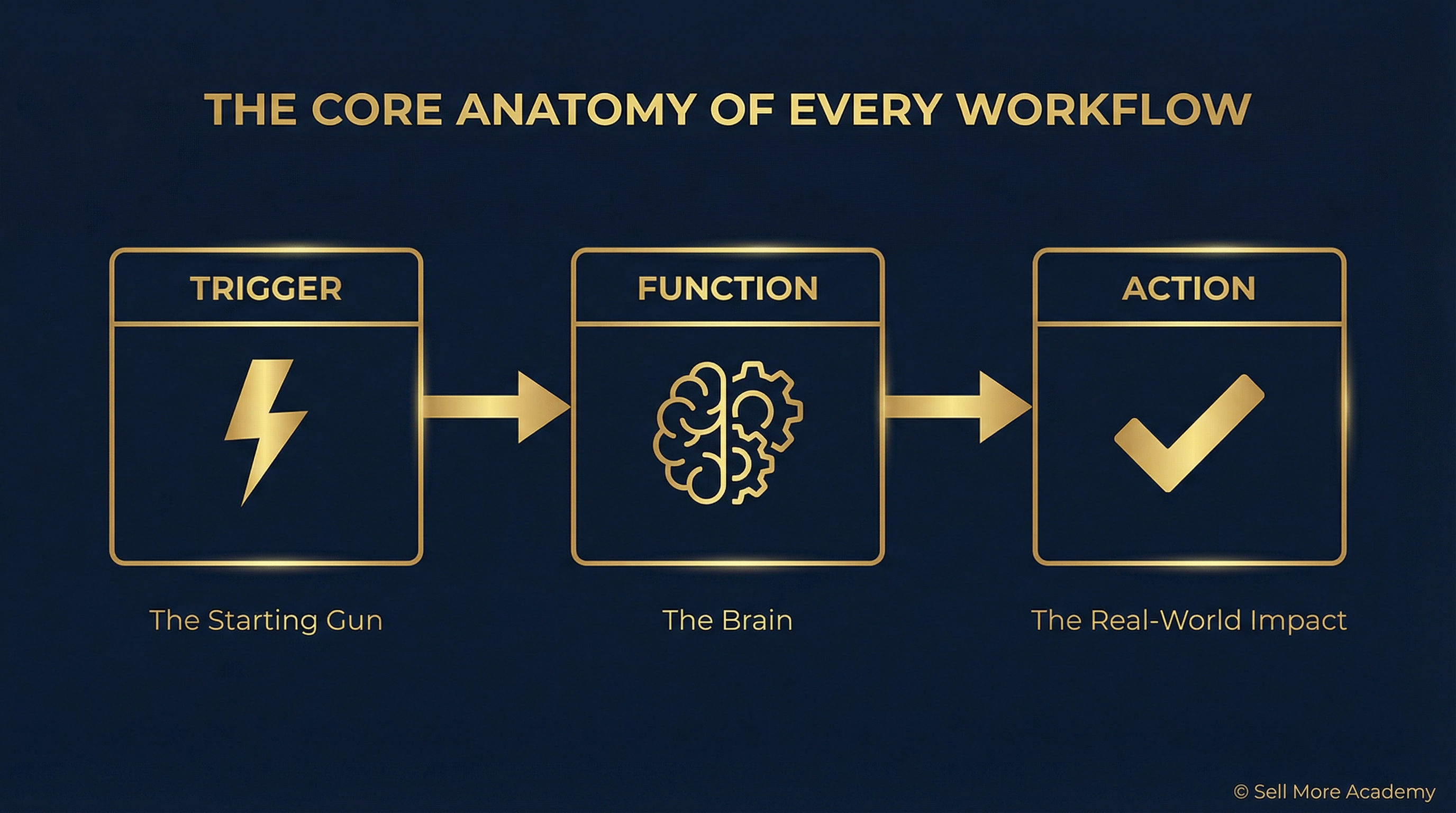
To truly automate, you must understand the core anatomy of a workflow. Whether you call it an automation, a workflow, or a playbook, it is simply a series of actions that go together.
There are three core functions you need to master.
1. The Trigger
Every automation needs a trigger to kick it off. It is the starting gun. The first domino to fall.
The specific event that wakes up your automation could be time-based, event-based, or data-based. Think about the moments in your day that consistently signal the start of a new task. A new form submission. A new row added to a table. A deal stage change in your CRM.
Identifying these triggers is the first step to reclaiming your time.
2. The Function
Functions provide logic to your automation. This is how we make workflows intelligent and responsive.
It is not always a simple "when this happens, do this every single time." There are nuances between customers, prospects, and standard operating procedures. Functions allow you to process data, set conditions, and integrate with other applications.
You can use functions to format data, filter based on criteria, add delays, or make API calls. They provide the brain to an individual automation.
3. The Action
The action is the final piece of the puzzle. This is the specific job you want your workflow to perform once the trigger fires and the function processes the information.
Think of the action as the concrete outcome. It is the tangible result delivered once the workflow has run its course. You might add a row to a sheet, create a new project in your management tool, or send a notification to your team.
The goal is to turn raw data into a real-world impact.
The Power of AI Builders
Now is the best time to rethink how you approach automation. Workflow builders have introduced AI capabilities that allow us to use natural language.
We do not have to be programmers. We do not have to worry about API calls or the intricacies of webhooks. We can simply talk like we would normally chat. We are moving beyond the drag-and-drop interface.
You can tell the AI what you want to happen and let it build the underlying logic for you. This dramatically increases the speed of building automations. What used to take an entire day can now be mapped out in minutes.
Build Your Blueprint First
Before you jump into an automation platform, you must map out your logic.
Identify your triggers. Determine what functions are needed. Describe the actions. Spend time doing this on a worksheet or a whiteboard before you start building. If you try to build as you go, you will build based on what you see instead of what you need.
Create the blueprint before you build the house.
This approach puts you back in the driver's seat. You have control over the steps of your workflow. You can streamline your business in a way that works for you and those you serve.
There is no strategy barrier. There is no understanding barrier. There is no execution barrier.
You are now an automation architect.
Want to see exactly how to build these workflows in real-time? Watch the full masterclass replay to see live demonstrations of AI builders in action and get access to our list of 101 no-code automation triggers.
Watch the Full Replay Inside Sell More Academy Mastermind.
Looking for more ways to optimize your systems?
Read our guide on How to Sell More with a Hype-Free AI Strategy to ensure your tools are actually driving ROI.



Facebook
Instagram
LinkedIn
X
Youtube
TikTok
Pinterest